| LOOP |
Record; stop and play; erase |
Looper |
| PLAY |
Play / pause, when you let go |
Looper |
| Hold PLAY, press LOOP |
No loop: a quantized recording. A loop playing: erase at its end |
Looper |
| PLAY while an erase waits |
Takes the erase back |
Looper |
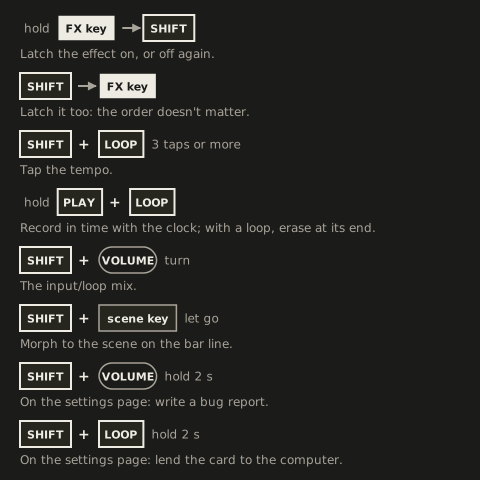
| SHIFT + LOOP |
Tap tempo |
Tap tempo |
| SHIFT + PLAY |
As PLAY |
Looper |
| Turn the transport knob |
Speed in semitones; paused, a scrub |
Transport knob |
| SHIFT + turn the transport knob |
Speed in 5ths and octaves |
Transport knob |
| Press the transport knob |
Back to 1× forward |
Transport knob |
| Turn VOLUME |
Page 1 output gain, page 2 input gain, page 3 the headphone feed |
VOLUME knob |
| Press VOLUME |
The next page |
VOLUME knob |
| SHIFT + turn VOLUME |
Input/loop mix |
VOLUME knob |
| SHIFT + press VOLUME |
The input/loop mix back to the loop alone, or the input alone without a loop |
VOLUME knob |
| Hold an FX key |
The effect on while held |
Playing an effect |
| Hold FX keys, then SHIFT |
Latch them on, or off |
Playing an effect |
| SHIFT, then an FX key |
Select it for the knobs, without hearing it |
Playing an effect |
| SHIFT + key 7, then key 7 again |
The phaser’s other mode: the frequency shifter, and back |
Frequency shifter |
| An FX key on a latched effect |
Unlatch it; on until you let go |
Playing an effect |
| White key 15 |
The finalizer on the knobs |
Finalizer |
| SHIFT + key 15, then key 15 again |
The finalizer’s next module: Level, EQ, Comp, Width |
Finalizer |
| Hold key 15, then SHIFT |
The finalizer bypassed, or on again |
Finalizer presets and bypass |
| Hold key 15 + a key of scenes 1-4 |
Recall a finalizer preset |
Finalizer presets and bypass |
| Hold key 15 + upper F#, G# or A# |
Save, copy or delete a finalizer preset |
Finalizer presets and bypass |
| Press knob 1-3 on the finalizer’s EQ, Comp or Width |
Mute that band, or unmute it |
Band mutes |
| Turn knobs 1-4 |
The selected effect’s parameters |
Keys and knobs |
| SHIFT + turn knobs 1-4 |
Coarse, to the next point of the grid |
Coarse steps |
| SHIFT + press knobs 1-4 |
That parameter back to its default |
Playing an effect |
| Press knobs 1-4 |
The effect’s page 2, and back to page 1 |
Page 2 |
| A scene key |
Recall the scene |
FX scenes |
| The active scene’s key |
Back to the scene as saved |
FX scenes |
| The blank scene’s key (lower F#) |
Every effect off, every knob on its default |
FX scenes |
| SHIFT + a scene key, let go |
Morph to it on the bar line; tap it again for each bar more, up to 8 |
Morphing to a scene |
| SHIFT + a scene key, press the transport knob |
Drop to it on the bar line |
Dropping to a scene |
| SHIFT + a scene key, turn the transport knob |
The crossfader |
Crossfading by hand |
| SHIFT + scene key A, then scene key B |
Build-up to A, B dropping at its end |
Dropping to a scene |
| SHIFT + a blinking scene key |
Stop the morph, drop or build-up where it is |
Timed scene changes |
| SHIFT + another scene key, while one runs |
Stop it there and start the new one from there |
Timed scene changes |
| Upper F#, G# or A#, the slot (copy: the source, then the destination), then CHOMPI |
Save, copy or delete a scene |
Save, copy and delete |
| The function’s key again, or the mode switch up |
Out of save, copy or delete, doing nothing |
Save, copy and delete |
| SHIFT + lower C# |
The Loops page |
The Loops page |
| SHIFT + lower D# |
The Cubbi page |
The Cubbi page |