Punch-in FX
Effects sit on the white keys and act on the whole input/loop mix, before the finalizer and VOLUME. The looper records the input before the effects, so an effect is never printed into a loop. Inserts stop the moment they’re off, the delay and reverb ring out (see Effect chain). Some heavy combinations of effects can need more processing time than there is, heard as crackles (see Processing load).
Playing an effect
Section titled “Playing an effect”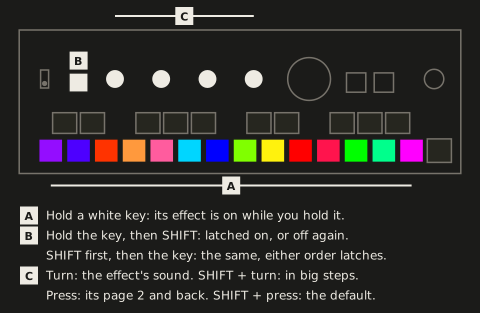
| Control | Function |
|---|---|
| Hold an FX key | Effect on while held |
| Hold an FX key, then SHIFT | Latch on / off: the effect stays on after release. Hold several FX keys, then SHIFT, to latch them all |
| SHIFT, then an FX key | Select: the knobs edit that effect without your hearing it; the key flashes |
| FX key on a latched effect | Clears the latch; the effect stays on until the key is released |
| Knobs 1-4 | The parameters of the most recently pressed or selected FX key, 1% per detent, faster when turned fast |
| SHIFT + knobs 1-4 | Coarse: the next point of the parameter’s grid per detent (see Coarse steps) |
| SHIFT + press knobs 1-4 | Resets that parameter to its default, on the page shown |
| Press knobs 1-4 | The effect’s page 2, and back (see Page 2) |
The details of the timing:
- Latch or select: the order decides. The key goes down first, then SHIFT a moment later, to latch. SHIFT first, or within about 15 ms of the key, is a select.
- The latch is settled when you let go of the key: holding an FX key and using SHIFT for something else (a coarse turn, tap tempo, the input/loop mix, selecting another effect) doesn’t latch it.
- A select leaves the effect off (or latched, if it was), and letting go of the key does nothing, also after letting go of SHIFT first, even just before the key goes all the way down (up to about 15 ms). The key flashes white, or dark while it’s already nearly white.
- Stepped parameters move one step per 3 detents: the shifter’s shift, the filter’s LFO and the delay’s divisions, the freezer’s length and roll, the slicer’s pattern and stereo, the tape stop’s stop and spin-up times, the flanger’s polarity, the chaos key’s grid, the phaser’s rate right of its centre (and the frequency shifter’s shift there).
- Turning speed: a knob turned slowly moves 1% a detent, for a precise setting. Turned faster than about 8 detents a second, its step grows smoothly, up to 5% a detent from about 40 a second, so a quick sweep across the whole range takes about one turn. Turned slowly again, it’s back to 1% from the next detent, and a value still stops exactly at 0% and 100%. The finalizer’s knobs speed up the same way; SHIFT + turn and the stepped parameters keep their steps however fast you turn.
Keys and knobs
Section titled “Keys and knobs”The FX keys are coloured by their place in the signal chain: the keys of a stage share a colour, the two of a pair in neighbouring shades (the freezer purple and the shifter indigo, the folder scarlet and the crusher orange, the flanger light blue and the phaser blue, wow & flutter red and the tape stop rose, the delay green and the reverb teal), and the next stage in a colour well apart. The phaser’s second mode, the frequency shifter, turns its key ice blue. The chaos key, which has no place in the chain, is magenta.
The FX keys are dimly lit in their effect’s colour while off and at full brightness while on, where the audio coming out of the effect pushes the colour towards white, from -30 dBFS up, the peaks most. The delay and reverb keys follow their returns, so after release they glow with the tail, fading from full back to dim. The knob LEDs show the parameter values in the effect’s colours; a knob the effect doesn’t use is dark and does nothing. Values reset at power-off unless they’re saved in a scene.
The knob LEDs use white for one thing only, a neutral point. A knob with a centre (the shifter’s shift and grain, the filter’s cutoff, the delay’s random and damping, every Band, the frequency shifter’s direction, the finalizer’s Input and its EQ and Width bands) is white there, blue below and orange above, the same on every effect, so you can see at a glance which way a knob is off. Every other knob starts in its key’s colour and goes to a second one, well apart from it. The phaser’s rate shows which half it’s in: its own colours while it runs free, green to yellow once it follows the tempo. Page 2’s knob 4 shows what the effect puts out instead of its value (see Page 2).
The knobs do the same kind of job on every effect, so you can find a setting without looking it up:
| Knob | Role | Where an effect has none |
|---|---|---|
| 1 | The main control: length, pitch, drive, rate, cutoff, pattern, wow, stop time, division, decay | — |
| 2 | Feedback (the filter’s resonance) | its second main control: shape, bits, decay, flutter, spin-up time, diffusion |
| 3 | Tone or colour: tone, roll, swoop, amount, LFO depth, chance, curve, random | — |
| 4 | A setting of the effect’s own, the one you play: gate, grain, symmetry, XOR, LFO division, polarity, centre, env mod, shuffle, age; ducking on the delay and reverb | the tape stop’s depth |
The chaos key makes no sound, so its knobs are its own: 1 the FX chance, 2 the scramble chance, 3 the grid, 4 random to pattern.
Every insert starts silent or nearly so: the knob that brings it in (shifter shift, folder drive, crusher rate and bits, filter cutoff, flanger amount, resonator feedback, wow and flutter, phaser depth) starts at off, the others at a setting that sounds good, so one turn brings the effect in. Three can’t be silent: the freezer starts at 1 bar, so a shorter press only hears the incoming signal; the slicer at every step on with the longest decay, a slight pump; and the tape stop stops on every press, over 1/2 bar. The delay and reverb are heard from the first press: their key is what sends sound into them, and their level (page 2’s knob 4) starts at 0 dB, as every effect’s. SHIFT + press on a knob takes it back there.
Each effect has its own chapter after this one, with its knobs on both pages and its details: Freezer, Shifter, Folder, Crusher, Filter, Flanger, Phaser, Resonator, Slicer, Wow & flutter, Tape stop, Delay, Reverb and the Chaos key.
Page 2
Section titled “Page 2”A press on any of knobs 1-4 turns all four over to the selected effect’s page 2: the parameters you set and leave rather than play. Another press turns them back. Turning the page blinks its number on the four knob LEDs in white, as VOLUME’s pages do: twice for page 2, once for page 1 (a turn cuts it short). A knob the effect has nothing on is dark and does nothing. Every effect but the chaos key has a page 2; the finalizer has none.
Pressing or selecting another effect, or the finalizer’s key, always brings back page 1, so the main controls are under your fingers whenever you pick an effect; pressing the key of the one already selected keeps its page. SHIFT + turn and SHIFT + press work on page 2 as on page 1. Turning the page doesn’t edit the scene, and scenes, recalls and morphs carry page 2’s values along with page 1’s.
Page 2 is laid out the same on every effect that has one, so your hand learns it once:
| Knob | Page 2 | Default |
|---|---|---|
| 1 | Mix: the dry sound against the effect’s, for parallel distortion, a harmony under the shifter, a half-frozen loop. On the delay and reverb: Freeze | fully the effect; freeze off |
| 2 | Stereo: how far the right channel parts from the left, each effect its own way (in its chapter). The tape stop, delay and reverb, which have no stereo knob, have a setting of their own there: darken, damping, pre-delay | off |
| 3 | Band: which part of the sound the effect works on. In the middle, all of it. Turned left, only the lows, below a split that falls from 20 kHz to 40 Hz; turned right, only the highs, above one that rises from 20 Hz to 8 kHz. The rest passes untouched, so a folder can grind the highs and leave the bass clean. On the delay and reverb it filters what goes in: right a low cut, left a high cut | the middle, all of it |
| 4 | Level: the effect’s output, not the dry sound Mix blends in: off at the bottom, then -36 dB to +12 dB. Its LED is a meter of the effect’s output (below). On the delay and reverb, the level of what comes back: the echoes, the room | 0 dB, at 3/4 |
Knob 4’s LED on page 2 is a VU meter of what the effect puts out, in the colours of VOLUME’s meter: from dim through green and yellow to pink at full scale (-30 dBFS up), and as bright as Level turns it, the way VOLUME’s LED is as bright as VOLUME. So page 2 shows itself whenever the effect sounds, and you see what Level does. It’s measured after Level and Mix, so at less than full Mix it shows some of the dry sound too. An effect that’s off shows only the dim floor. On the delay and reverb it shows their return (the echoes, the room, their tails too, after the key is let go).
- Nothing evens out levels by itself. An effect that adds level, like the folder driven or the crusher’s XOR on a quiet sound, comes out louder, and Level is how you set it. Level and Mix fade in and out with the key, as the effect does; with the key off, the sound passes untouched whatever page 2 says. The tape stop keeps them on while it spins up after you let go. The delay’s and reverb’s key fades what goes into them instead, and their Level stays, so their tails ring out at it.
- At the defaults an effect sounds exactly as without page 2.
Coarse steps
Section titled “Coarse steps”SHIFT + turn moves one point of a fixed grid per detent, however fast you turn, always to the next point in the direction you turn, so a value set finely snaps onto the grid with the first coarse move:
| Parameter | Coarse grid |
|---|---|
| Resonator pitch | The notes at A440 (110 Hz is A2), F#0 to A5 |
| Shifter shift | -12, -7, -5, 0, +5, +7, +12 semitones (octaves, fifths, fourths) |
| Shifter stereo | Quarter semitones |
| Mix and Band (page 2) | 10% |
| Level (page 2) | 6 dB steps, with 0 dB on one |
| Crusher rate | 48 kHz divided by 4, 8, 16, 32, 64: 12 kHz, 6 kHz, 3 kHz, 1.5 kHz, 750 Hz |
| Crusher bits | Whole bits |
| Folder drive | Doublings: 1×, 2×, 4×, 8×, 16×, 32× |
| Folder and crusher tone | Octaves down from open: 20 kHz, 10 kHz, 5 kHz … 312 Hz |
| Resonator tone | Octaves down from 15 kHz: 7.5 kHz, 3.75 kHz, 1.9 kHz |
| Wow & flutter tone | Octaves down from open, as the folder’s and crusher’s |
| Stepped parameters (freezer length and roll, filter LFO and delay divisions, slicer pattern and stereo, tape stop and spin-up times, flanger polarity, chaos grid) | One step per detent instead of per 3 |
| Phaser rate | Left of the centre the knob’s 10% steps (0.02, 0.07, 0.4, 1 and 14 Hz), then each division, one per detent: from the free half up, the first stop is 1/16 on the centre; from the synced half down, past 1/16 onto the free half’s 10%. The frequency shifter’s shift on the same points |
| Phaser centre | Octaves: 100, 200, 400, 800 Hz … 6.4 kHz |
| Everything else, filter cutoff included | 10% steps |