Looper
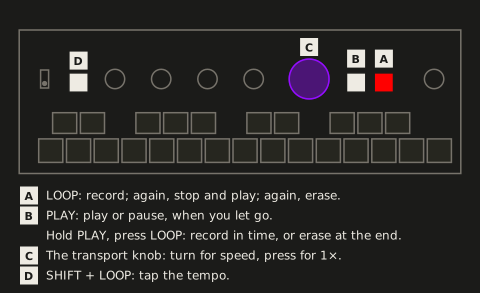
FRIZZ has one loop. It records the input before the effects, so you can play effects over it without printing them into it. LOOP and PLAY run it:
| Looper | Key | Result |
|---|---|---|
| Empty | LOOP | Start recording |
| Recording | LOOP | Stop and play |
| Loop exists | PLAY | Play / pause, when you let go of PLAY (not if you pressed LOOP while holding it) |
| Loop exists | LOOP | Erase now, as LOOP goes down |
More looper gestures:
| Looper | Key | Result |
|---|---|---|
| Empty | hold PLAY, press LOOP | Start a quantized recording (needs MIDI clock from the clock source, otherwise LOOP blinks red 3 times) |
| Recording quantized | LOOP | Stop at the end of the current bar, then play |
| Loop exists, playing | hold PLAY, press LOOP | Erase at the end of the loop (LOOP blinks red until then; paused, it erases now) |
| Erase waiting for the end | LOOP / PLAY | LOOP erases now; PLAY takes the erase back, the loop plays on |
| Any | SHIFT + LOOP | Tap tempo (see Tap tempo); never records, stops or erases |
| Loop exists | SHIFT + PLAY | As PLAY: play / pause |
- Quantized: recording starts on the press, which counts as bar 1 (4/4). Ending it records to the end of the bar in progress, so the loop is always a whole number of bars. It closes immediately if the clock stops.
- Erasing uses the gestures that record: LOOP at once, PLAY + LOOP quantized, here to the loop’s own end, so it needs no clock. For half a second after LOOP stopped a recording, LOOP doesn’t erase, so a double press can’t lose the new loop.
- Length: up to 2:45. The loop lives in RAM and is gone at power-off. There’s no overdub.
- Level: the loop never clips: a limiter holds what goes into it just under full scale (details in Technical data). If the meter on VOLUME’s page 2 shows red on more than the loudest hits, turn the input gain down.
LEDs: LOOP is red while recording and blinks while a quantized recording finishes its bar or an erase waits for the loop’s end, at the slow blink everything waiting uses (a picked scene slot, the CHOMPI key ready to confirm); a refusal is 3 quick blinks. While a loop plays, PLAY and LOOP crossfade in white to show the position (dimmed when paused).
PLAY also shows the beat the effects follow (see Tempo and transport), as the settings page’s lower G# does:
| Looper | PLAY |
|---|---|
| No loop | dim white for the first half of each beat |
| Recording | the same, a count while LOOP is red |
| Playing | the crossfade, with a short flash on each beat (whiter, or darker where PLAY is already bright), stronger on each bar’s 1 |
| Paused | the dim position, the beat pulsing over it (the tempo runs on) |
LOOP’s red blinks (a recording closing, an erase waiting, a refusal) show as above. The beat dims with the LED brightness.
Transport knob
Section titled “Transport knob”The transport knob, the big purple one, sets the loop’s speed: turn it for faster, slower or backwards, press it for 1× forward again; paused, it scrubs. Its speed and scrub need a loop. With a scene morph held (SHIFT + a scene key), it’s the crossfader and the drop instead, with or without a loop.
| Control | Function |
|---|---|
| Turn while playing | Speed in semitones (2 detents per semitone), as TAPE’s knob runs: from 2× down to 1/16×, then a standstill for about 4 detents (the tape glides to a stop, 0×), then reverse from −1/16× up to −2×; the same way back. Stops at 2× and −2× |
| SHIFT + turn while playing | Speed in 5ths and octaves (4 detents per step): from between two of them, to the next one in the turn’s direction. Past 1/16× it flips into reverse at the same speed and climbs back up to −2×; from a standstill, 1/16× the way you turn |
| Turn while paused | Scrub |
| SHIFT + turn while paused | Nothing |
| SHIFT + turn, with a scene morph held | The crossfader, playing, paused or without a loop |
| Press | Back to 1× forward |
| SHIFT + press, with a scene morph held | A drop, with or without a loop |
| SHIFT + press otherwise | Nothing (the bug report is on the settings page) |
- Standstill (the transport knob between 1/16× and −1/16×): the tape glides to a stop and the loop fades out with it, a tape stop rather than a click, and stays silent while it stands. The effects’ beat runs on by itself as while paused (see Tempo and transport), at the slowest speed’s tempo, 50 BPM, so a scene morph still lands on its bar line. Turned on, the loop fades back in with the speed, and the beat snaps back onto it.
The transport LEDs show speed and direction while it plays (both red at a standstill), the scrub speed in white while it’s paused, and nothing without a loop.