Playing loops
Loops from the card play from two pages of their own, the Loops page for yours and the Cubbi page for TAPE’s, where the white keys are the loops. To get loops onto the card, see Loop loader.
The Loops page
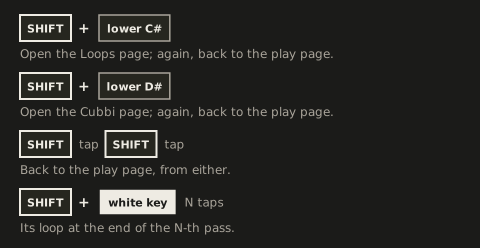
Section titled “The Loops page”SHIFT + the lower C# opens the Loops page. SHIFT + the lower C# again, or two quick taps of SHIFT (each a short tap with nothing else in between), takes you back to the play page. On the play page a double tap does nothing, so it’s a safe way home wherever you are. SHIFT + the lower D# takes you to the Cubbi page. Opening the Loops page ends a save, copy or delete you had started. Flipping the mode switch up and down again brings you back to the page you were on. With no loop file on the card, the page opens with its white keys dark, and the lower C# and D# blink red 3 times.
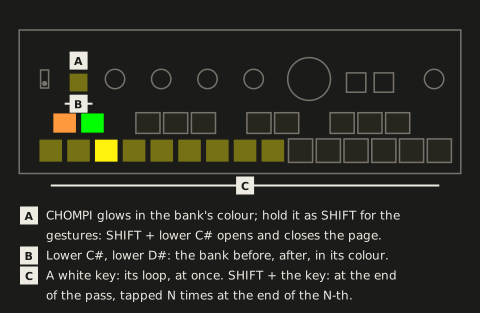
While you’re on the Loops page, the CHOMPI key glows dimly in the bank’s colour (white while you hold it as SHIFT). The CHOMPI key’s LED only ever shows SHIFT held, the page you’re on, a scene save, copy or delete waiting for its confirm, the start-up ripple and the low-battery warning.
| Control | Function | LED |
|---|---|---|
| Lower C#, lower D# | The bank before, the bank after; banks without a file are skipped | each in the colour of the bank it leads to; dark at the first or last bank, where a press blinks red 3 times |
| A white key | Switch to its loop at once | see below |
| SHIFT + a white key, tapped N times | Switch at the end of the N-th pass | blinks on the beat while it waits |
| SHIFT + a scene key, the transport turned, a white key | Both loops on the crossfader | see Two loops on the crossfader |
| Scene keys, the transport knob, PLAY, LOOP, SHIFT + LOOP, VOLUME | As on the play page | as on the play page |
| Knobs 1-4, upper F#, G#, A# | Nothing | dark |
The banks’ colours: A orange, B yellow, C green, D teal, E light blue, F blue, G purple, H pink. The bank you’re on shows on the CHOMPI key and the white keys; the lower C# and D# show where they lead. A white key shows its loop:
| LED | Means |
|---|---|
| Dark | No loop on that key; pressing it blinks red 3 times |
| Dim, the bank’s colour | A loop |
| Dim red | A file FRIZZ refuses; pressing it blinks red 3 times |
| Bright | The loop playing |
| Blinking on the beat | Planned: it takes over when its time comes |
| Blinking fast | Planned, still loading from the card |
The effects can’t be punched in by hand there, since the white keys are the loops, but the latched ones and the chaos key play on, and MIDI notes still play the effects. Notes 66, 68 and 70 do nothing there, as the upper F#, G# and A# don’t, nor do notes 36-39, as the knobs’ presses don’t.
The Cubbi page
Section titled “The Cubbi page”The Cubbi page plays what you recorded with TAPE, the CHOMPI’s sampler firmware: its cubbis, the recordings TAPE keeps one on each white key, in 5 banks, a to e. You don’t copy anything: FRIZZ reads them where TAPE keeps them, and never changes them.
- Where: in the folder
TAPEon the card if there is one (the multi-firmware launcher’s TAPE keeps its files there), otherwise in the card’s root (TAPE on its own). If there’s aTAPEfolder, FRIZZ looks only there, as the launcher’s TAPE does. - Which: the files
cubbi_a1.wavtocubbi_e15.wav, the bank’s letter and the white key from the left, as TAPE names them. TAPE’s other files (its chromatic samples,jammi_…, and the…_double.wavcopies it keeps for fast playback) aren’t loops, and FRIZZ leaves them out. TAPE’s own 15th key plays its recording buffer rather than a file, so the 15th key here is usually dark. - What it takes: what TAPE records, 16-bit 48 kHz stereo, up to about 77 s, as on the Loops page. TAPE can record up to about 165 s: a longer cubbi shows dim red, and pressing it blinks red 3 times.
SHIFT + the lower D# opens the Cubbi page, from the play page or the Loops page. SHIFT + the lower D# again, or two quick taps of SHIFT, takes you back to the play page, and SHIFT + the lower C# to the Loops page. Everything else works as on the Loops page: the lower C# and D# step the banks, a white key switches at once, SHIFT + a white key at the end of a pass or with a scene change, the same LEDs. Each page remembers its bank, and there’s one plan for both: a loop planned on one page is replaced by a key on the other. With no cubbi file on the card, the page opens with its white keys dark, and the lower C# and D# blink red 3 times.
The banks show in TAPE’s own colours, so you recognise them: a purple, b orange, c teal, d dark orange, e yellow-green. While you’re on the page, the CHOMPI key glows dimly in the bank’s colour, and the lower C# and D# in the colours of the banks they lead to.
Switching loops
Section titled “Switching loops”- A white key switches to its loop at once, with a short crossfade (10 ms). It keeps time: the new loop starts as far into its pass as the loop playing is into its own, counted round the new loop’s length. So two loops at the same tempo stay on the beat, whatever their lengths and whatever tempo FRIZZ guesses for them. With no loop playing it starts from the top and the input/loop mix goes to the loop, as after a recording; paused, it waits at its start for PLAY. The key of the loop playing starts it again from the top.
- SHIFT + a white key switches at the end of the loop playing, without a gap, the new loop from its start. Tap the white key more times for more passes: twice is the end of the next pass, and so on, up to 8. The passes count from when you let go of SHIFT. With no loop playing, or paused, it switches at once.
- The last white key counts: another white key replaces what you planned.
- Loading takes under a second for the longest loops. A loop not loaded by its time switches at the end of the first pass after it is.
- To cancel, hold SHIFT again (in a new hold: in the one that planned it, a tap adds a pass) and tap the blinking key: nothing switches, and a scene change running stops where it is.
- A white key while LOOP records blinks red 3 times.
A loaded loop is the loop
Section titled “A loaded loop is the loop”- LOOP erases it, as it erases a recording (and a switch waiting with it); then LOOP records a new one. PLAY pauses and plays it; the transport knob changes its speed, scrubs it while paused.
- The tape runs on across loops. Every switch keeps the transport’s speed and direction: at once, planned, with a scene and on the crossfader. A loop you switch to at double speed plays at double speed; in reverse it starts from its end, in reverse; at a standstill it stands too. Only erasing (LOOP) puts the tape back to 1× forward, so a new recording, or a loop loaded after an erase, starts at 1×; pressing the transport knob is 1× forward, as always.
- Its tempo: a loop’s tempo is its own times the speed, and the effects’ tempo follows it
from the switch. FRIZZ takes its beats from its
acidchunk; without one it guesses them from its length: the power of two beats (1, 2, 4, 8 …) that puts it closest to the tempo of the loop playing (at 1×), or to the last tempo, between 50 and 300 BPM; at power-on, with no tempo set yet, the one that puts it between 80 and 160 BPM, as for a recording. If that lands at half or double the tempo, or the loop holds 3 or 6 bars, tap the tempo (SHIFT + LOOP) and the beats fit again.
Loops over MIDI
Section titled “Loops over MIDI”A DAW or a controller picks loops with a bank select and a program change, on FRIZZ’s global channel, from any page: CC 0 = 1-8 for FRIZZ’s banks a-h, 9-13 for the cubbis’ a-e, then program change 0-14 for the white key. CC 54 says when it switches (at once, at the end of a pass, or with a scene change), and CC 81 cancels. With MIDI feedback on, a switch you make by hand goes out the same way, so a DAW can record it. The details: Program changes.