Settings page
With the mode switch up, the keys set up MIDI, the input and the LEDs. The loop, the effects and MIDI play on meanwhile; switch back down to play.
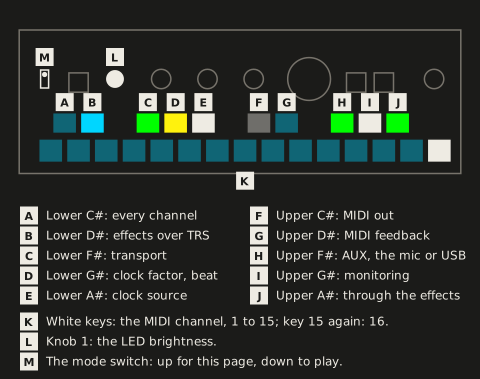
Each key sets one thing on its press. The white keys pick the MIDI channel; the dark keys and knob 1 set the rest:
| Control | Setting | Colour |
|---|---|---|
| White keys 1 to 14 | MIDI channel 1 to 14; the one in force lit, the others dim | light blue |
| White key 15 | Channel 15; pressed again 16, again 15, and so on (default 16) | light blue for 15, white for 16, dim for neither |
| Lower C# | MIDI on every channel: lit when on. It only switches it on; a channel key switches it off | light blue |
| Lower D# | Effect channels over TRS: on (lit, default) / off (dim). Over USB they always count | light blue |
| Lower F# | MIDI transport following: on (lit) / off (dim) | green |
| Lower G# | Clock factor, each press the next: as sent (default), double, half. It also shows the beat: lit for the first half of every beat, dim for the second | yellow (as sent), red (double), light blue (half) |
| Lower A# | Clock source, each press the next: Auto (default), TRS, USB, internal | white (Auto), orange (TRS), blue (USB), pink (internal) |
| Upper C# | MIDI out, each press the next: off (default), TRS, TRS and USB | dim (off), orange (TRS), white (TRS and USB) |
| Upper D# | MIDI feedback: on (lit) / off (dim, default) | light blue |
| Upper F# | The input’s source, each press the next: AUX, the built-in mic, USB (a computer). Not saved: AUX’s jack picks AUX or the mic again when a cable goes in or out, but leaves USB | green (AUX), magenta (mic), blue (USB; dim while USB audio is off) |
| SHIFT + upper F# | With AUX or the mic: mono input, mono / stereo (default). With USB: USB audio on (default) / off. While you hold SHIFT, the upper F# shows it: lit when on, dim when off. With the card lent to the computer, USB audio can’t switch: it blinks red 3 times | white; red (refused) |
| Upper G# | The source’s monitoring, on the outputs: on (lit) / off (dim). AUX and USB on, the mic off at first | white |
| Upper A# | The source’s effects: through them (default) / past them and the finalizer. Dark while the source isn’t monitored: pressed then, it blinks red 3 times and changes nothing | green (through), white (past) |
| Knob 1 | LED brightness: turned, 5% a detent from 25% to 100% (default); SHIFT + turn the next of 25, 50, 75, 100%; SHIFT + press 100% | its LED white, as bright as the LEDs are |
The dark keys are grouped by topic: the lower ones are MIDI in, the upper ones MIDI out and the input.
-
The beat on the lower G# is the tempo the effects follow right now (see Tempo and transport): with a loop, the loop’s at its speed; otherwise the MIDI clock’s; otherwise the last tempo, each with the clock factor applied (a loop, a clock or a tapped tempo of 120 at double beats at 240). It’s there to see the tempo, not to play to: it can be a little late, up to a few hundredths of a second. The play page shows it on PLAY too (see Looper).
-
VOLUME works here as on the play page, on two of its pages: turned, page 1 sets the output gain, page 2 the input gain (of the input you hear); a press picks the other page. There’s no page 3 and no input/loop mix here: SHIFT + turn does nothing. Coming from VOLUME’s page 3 on the play page, it’s on page 1.
-
VOLUME’s LED shows the battery, but for 2 s after you turn or press VOLUME, when it shows its page as on the play page: white while the charging cable is in, green above 3.3 V, yellow below. Below 3 V, on any page, the low-battery countdown starts (Power and battery) and VOLUME’s LED flashes red. Pull the cable and it shows the battery’s colour within a few seconds; after that the level is read every 30 s.
-
The transport LEDs are purple, so the page can’t be mistaken for the play page.
-
SHIFT + VOLUME, held 2 s: hold SHIFT and press and hold the VOLUME knob, in either order; after 2 s it writes a bug report, once per hold. CHOMPI lights white while you hold it, as on the play page. SHIFT held from the play page, the switch flipped up with it held, counts here as for every SHIFT combination, for SHIFT + LOOP’s hold too.
-
Otherwise knobs 2-4 (their LEDs dark), CHOMPI (but as SHIFT), PLAY and LOOP do nothing here.
-
A key you’re holding when you flip the switch stays where it went down until you let go: an effect you hold keeps going, and the key doesn’t also change a setting. The same the other way round.
-
Flipping up ends a save, copy or delete function: nothing is saved, copied or deleted, and you’re out of the function when you flip back down.
-
The low-battery warning dims with the LEDs too.
-
Every setting but the source itself (AUX, the mic or USB) is saved on the card with the finalizer, 2 s after the last change, so it comes back at power-on: each source’s monitoring and effects, all three input gains and USB audio too. None is part of a scene. Without a card, or when the card can’t be written, the key you changed last (or knob 1’s LED, for the brightness) blinks red 3 times, and FRIZZ tries again 2 s later, up to 3 times; the setting then lasts until power-off.
LED brightness
Section titled “LED brightness”Knob 1 on the settings page sets how bright every LED is, for a dark stage: turned, 5% a detent, from 25% to 100%; SHIFT + turn goes to the next of 25, 50, 75 and 100%; SHIFT + press is back to 100%. Its own LED is white and dims with all the others, so it shows where you are. The dim colours keep their hue, and nothing lit at 100% goes dark; below 25% they would. Saved 2 s after the last turn.